
E-sports injuries are real overuse and posture-related problems affecting hands, wrists, shoulders, neck and back, but they are highly preventable with simple daily habits. Understanding load management, basic ergonomics and short routines of stretching and strength is enough to reduce pain, keep performance high and avoid long breaks.
Essential Findings on E‑Sports Injuries
- Most e-sports injuries are cumulative overload issues, not single traumatic events.
- Pain usually starts mild and intermittent; ignoring early signs is the main risk factor.
- Good ergonomics and micro-breaks are more protective than buying one “perfect” chair.
- Targeted strength, mobility and nerve-gliding work protects hands, wrists and neck.
- Early consultas fisioterapia para jogadores de e-sports drastically shorten recovery time.
- Return-to-play should be gradual and monitored, not an instant full-volume comeback.
E‑Sports Injury Landscape: incidence, risk groups and common diagnoses
E-sports injuries sit between office overuse syndromes and classic sports injuries. The main pattern is repetitive, high-precision hand use under time pressure, combined with prolonged static sitting. This loads tendons, small joints and nerves of the upper limb, plus neck, shoulders and lumbar spine.
Risk is highest for players with long daily sessions, low physical conditioning and poor workstation ergonomics. Younger players often believe they are “invincible”, tolerate pain and delay care. Older or semi-professional gamers usually have more awareness, but may accumulate many years of suboptimal posture and habits.
Typical clinical labels include wrist and finger tendinopathies, lateral epicondylalgia, medial epicondylalgia, De Quervain-related “gamer’s thumb”, carpal or cubital tunnel syndromes, neck pain with or without radiating symptoms, and mechanical low back pain. Headache and visual fatigue are frequent companions, even if they are not injuries by themselves.
In Brazil, discussions on lesões em e-sports prevenção e tratamento are growing inside teams, clinics and training centers, but implementation still lags. The gap is less knowledge and more consistency: players often know they “should stretch” or “fix posture”, yet do not transform that into daily systems.
Debunking Myths: repetitive strain, ‘gamer’s thumb’ and overtraining
-
Myth: Pain means tissues are already permanently damaged.
Reality: Pain is an early warning about overload, not a guaranteed injury. If you react quickly by reducing volume, adjusting ergonomics and doing targeted exercises, you can often reverse symptoms before structural damage happens. -
Myth: “Gamer’s thumb” is only about the thumb joint.
Reality: De Quervain-like patterns involve tendons and sheaths along the thumb side of the wrist and forearm, plus movement patterns of the whole upper limb. Treating only the thumb with rest or taping, without altering grip and forearm load, is incomplete. -
Myth: Repetitive strain injuries are inevitable if you play many hours.
Reality: High volume raises risk, but micro-breaks, structured warm-ups, strength and mobility can make even long sessions tolerable for most players. Workstation setup and physical conditioning are often more decisive than pure hours played. -
Myth: Overtraining in e-sports is only mental fatigue or tilt.
Reality: Overtraining here mixes cognitive overload with musculoskeletal fatigue. Signs include slower reactions, decreased precision, lingering soreness and escalating pain across days. Load management in gaming should be treated as seriously as in physical sports. -
Myth: If rest reduces pain, the problem is solved.
Reality: Rest calms symptoms but does not fix weak links, tight tissues or bad ergonomics. Unless you add progressive loading, posture changes and skill-based movement drills, pain usually returns at the same or even lower volume. -
Myth: Only mouse-hand players get injured.
Reality: Keyboard, mouse, controller and even mobile players share similar mechanisms: small joint overuse, tendon friction and nerve compression. The specific pattern changes (thumb vs. fingers vs. wrist), but the prevention logic is almost identical across devices.
Posture and Ergonomics: chair, desk, monitor and controller setup
Posture and ergonomics must be practical, not perfectionist. The goal is to minimize unnecessary stress on joints and soft tissues while you maintain performance. Think in terms of ranges and comfort zones, not rigid “90-degree” rules.
For many Brazilian players, upgrading setup gradually is more realistic than buying everything at once. Strategic choices in ergonomia para gamers cadeira e mesa profissionais deliver most of the benefit: correct height relationships, good support and flexibility to switch positions during long sessions.
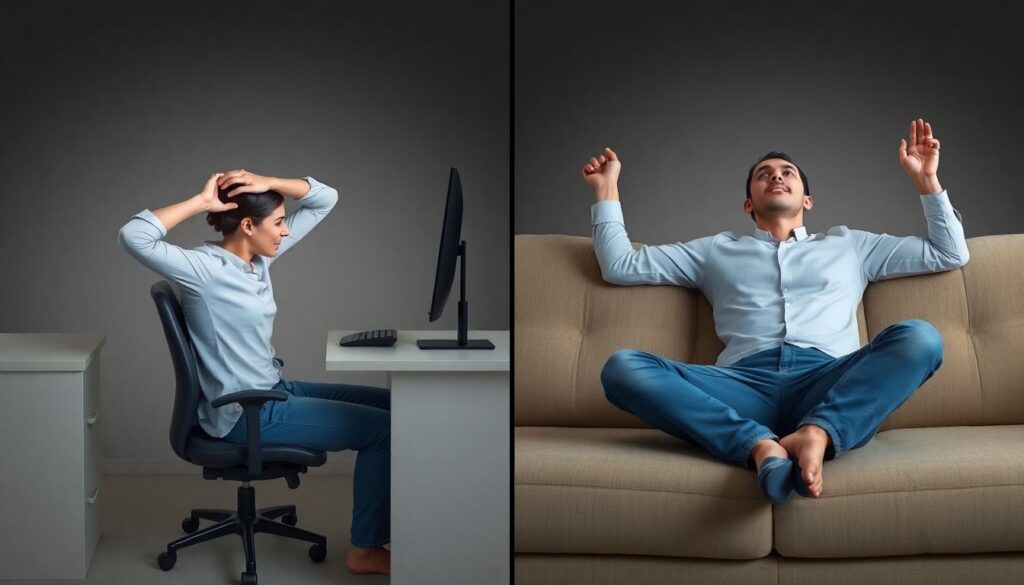
Typical setup scenarios that create problems
-
Low chair with high desk.
Shoulders elevate, upper trapezius tightens and wrists overextend on the desktop edge. Quick fix: raise the chair, use a foot support if needed, and lower the keyboard/mouse plane or bring them closer to your body. -
Reclined “sofa gamer” posture.
Playing on a couch with laptop or controller usually means kyphotic spine, forward head and unsupported forearms. This loads the neck and lumbar area while forcing awkward wrist angles. Even a basic office chair and stable table is usually safer. -
Monitor too high or too low.
Excessive neck extension or flexion increases neck and shoulder tension. Aim for the top of the screen at or slightly below eye level, with the monitor an arm’s length away, adjusting for your vision and game genre. -
Armrests too far from the desk.
If elbows cannot rest close to the table edge, you hover your arms and overload shoulders. Set armrests to allow elbows roughly at the level of the desk, so forearms are supported without lifting shoulders. -
Wrong size or shape of peripherals.
Inadequate equipamentos ergonômicos para gamers teclado mouse cadeira force extreme angles or large travel distances. A smaller mouse, shorter key travel or split keyboard can reduce ulnar deviation and finger strain, especially for players with smaller hands or high APM titles. -
Controller grip death-clench.
Holding the controller with constant maximal tension fatigues thumb tendons and small hand muscles. Practice lighter grip, use paddles or remapping when useful, and rest hands completely during cutscenes or queues.
Physiology and Pathophysiology: muscles, nerves and inflammatory responses

Most gaming-related problems arise from repeated low- to medium-intensity loads with insufficient recovery. Muscles fatigue, coordination worsens and joints lose their ideal tracking over time, creating uneven pressure on tendons and neural structures. Static postures further reduce blood flow and increase passive tissue tension.
Once irritation starts, local inflammatory responses and neurochemical sensitization lower the threshold for pain. Movements that were previously comfortable become painful under the same or even lighter loads. At this stage, addressing both peripheral tissues and central sensitivity (sleep, stress, fear of movement) becomes important.
Protective mechanisms and benefits of adaptation
- Muscles strengthen and develop endurance when progressively loaded with good technique and enough rest.
- Tendons become more tolerant if exposed to controlled, heavy-slow loading rather than only quick, repetitive clicks or taps.
- Nerves glide better when joints move through full, smooth ranges, reducing friction and compression.
- The nervous system becomes less sensitive when pain is addressed early with active rehab instead of long passive rest.
Limitations and risk factors you cannot ignore
- Genetic and anatomical variations (narrow tunnels, joint hypermobility) can increase vulnerability even with good habits.
- Sleep deprivation, high stress and poor nutrition amplify pain perception and slow recovery.
- Pure “stretching only” strategies do not build load tolerance and may give a false sense of security.
- Ignoring radiating symptoms (numbness, tingling, radiating pain) risks progression to more serious nerve compression issues.
Prevention and Conditioning: warm-ups, breaks, strength and mobility protocols
Prevention for gamers is about reducing peaks of stress and building a higher physical capacity to tolerate play. This means short warm-ups, smart breaks and minimal but consistent conditioning, not turning players into bodybuilders.
When planning alongamento e exercícios para gamers prevenir lesões, aim for time-efficient routines that fit into queues, champ select or loading screens. That is easier to maintain than long separate sessions that compete with scrims or ranked grind.
Typical mistakes and persistent myths in prevention

-
Only stretching, never strengthening.
Many players stretch fingers and wrists but never strengthen forearms, shoulders and upper back. Tendons need progressive loading to become resilient; otherwise, they stay weak and easily irritated despite daily stretching. -
Warm-up equals “two wrist circles”.
A useful warm-up includes general blood flow (standing, marching, a few squats), then specific moves (wrist flexion/extension, finger flicks, neck mobility). Two lazy wrist circles before queueing do not meaningfully prepare tissues for hours of intense play. -
Breaks only when pain is severe.
Waiting for strong pain means you already lost the prevention game. Use timed micro-breaks every 45-60 minutes: 2-3 minutes standing, shoulder rolls, wrist and finger mobility and looking far away to relax the eyes. -
Random gym work without targeting weak links.
General training is great, but for gamers you want extra focus on grip strength, wrist control, posterior shoulder, mid-back and core endurance. Ten minutes of focused accessory work beats unfocused machine hopping. -
Assuming posture fixes must be perfect or they are useless.
You do not need an ideal studio setup. Small improvements to chair height, monitor distance and arm support already cut a lot of strain. Waiting for a full hardware upgrade before changing habits wastes time and increases risk.
Rehabilitation and Return-to-Play: assessment, treatment strategies and benchmarks
Rehabilitation begins with a structured assessment: history of symptoms, gaming volume, hardware, ergonomics and a physical exam of joints, muscles, tendons and nerves. From there, a tailored plan addresses pain reduction, capacity building and gradual reintroduction of gaming volume.
In many cases, early consultas fisioterapia para jogadores de e-sports guide this process and avoid common traps like over-resting or returning to full volume too fast. Treatment often combines manual work, progressive loading, ergonomic changes and education about pacing and warning signs.
Mini case example: wrist pain in a competitive FPS player
Imagine a 22-year-old FPS player with radial wrist pain on the mouse hand. Symptoms started as mild discomfort after long scrims, then progressed to pain during early rounds and small losses in aim stability.
Assessment reveals: high DPI with large flick movements, extended wrist posture, no warm-up, and a recent increase in ranked grind hours. Palpation shows local tenderness over the wrist extensors, with reduced grip strength compared to the non-dominant hand.
Treatment strategy follows a simple progression:
- Short-term load reduction (less volume, lower intensity modes), plus ergonomic tweaks: slightly lower mouse, neutral wrist, experimenting with sensitivity to reduce extreme flicks.
- Pain-modulating techniques and exercises: isometric wrist extension holds, gentle range-of-motion, soft tissue work as needed.
- Capacity building: heavy-slow forearm loading (wrist curls/extensions, pronation/supination), grip strength, shoulder and scapular stability exercises 2-3 times per week.
- Graded return to full aim training: increase total mouse-heavy time gradually while monitoring pain during and 24 hours after sessions.
- Long-term maintenance: integrate warm-ups, scheduled breaks and periodic deload weeks into the player’s training calendar.
Quick self-checklist for healthy gaming and faster recovery
- Before each long session, do at least 3-5 minutes of general movement plus specific wrist, finger and neck mobility.
- Every 45-60 minutes, stand up and move for 2-3 minutes, fully relaxing hands and changing focus away from the screen.
- Adjust chair, desk and monitor so shoulders are relaxed, wrists neutral and eyes level with the upper part of the screen.
- If pain or tingling persists for more than a few days or worsens with play, reduce load and seek a professional evaluation.
- Twice per week, include short strength and control sessions for forearms, shoulders, upper back and core.
Common Concerns Answered About Gaming-Related Injuries
How do I know if my gaming pain is serious enough to see a professional?
Warning signs include pain that persists for more than a week despite rest, night pain that wakes you up, numbness or tingling, visible swelling or weakness gripping objects. These justify assessment by a health professional familiar with repetitive strain and gaming demands.
Can an ergonomic chair and desk alone prevent e-sports injuries?
Good furniture reduces risk but does not replace breaks, conditioning and load management. Ergonomic setups work best when combined with movement habits and targeted exercises. Even perfect equipment cannot protect you from ten-hour marathons without pauses.
How many hours per day can I safely play without increasing injury risk?
There is no universal safe number because tolerance depends on conditioning, ergonomics and previous injuries. Instead of chasing a fixed hour limit, monitor how you feel during and after play, schedule regular breaks and adjust volume when early warning signs appear.
Do wrist braces and supports help or harm gamers?
Short-term use can reduce pain and remind you to avoid extreme positions, especially during flares. Long-term constant use, however, may reduce muscle activity and sense of position. They should complement, not replace, strength, mobility and ergonomic changes.
Is it better to stop gaming completely until pain disappears?
Full rest is rarely necessary and can sometimes delay recovery. More often, a reduced and carefully controlled volume of play, combined with rehab exercises, keeps skills sharp while tissues heal. Stopping completely is usually reserved for severe or acute cases.
Are mobile gamers at lower risk than PC or console players?
Not necessarily. Mobile gaming involves intense thumb and neck loading, often with poor posture on beds or sofas. The injury pattern is different, but the same principles apply: breaks, posture awareness, conditioning and early response to symptoms.
Can general gym training replace specific exercises for hands and wrists?
General training improves global health and resilience but often under-loads the small muscles and tendons stressed in gaming. Specific forearm, grip and fine control work is still valuable, especially for competitive players or those with a history of symptoms.